WP Launcher (Windows Phone Style) (MOD)
How to install APK / APKS / OBB file on Android
Prefer apk.dog on GoogleHi, There you can download APK games file "Launcher 8" for Android free, apk file version is 3.5.9 to download to your android device just click this button. It's easy and warranty. We provide only original apk files. If any of materials on this site violates your rights
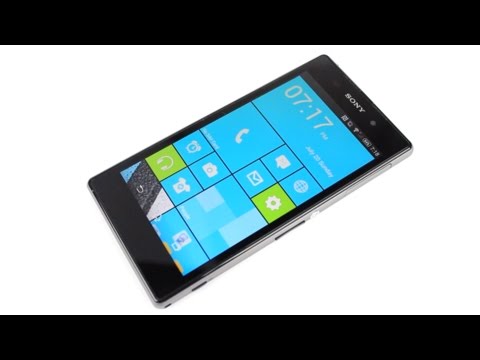
Need to put Windows on your Android phone? How to convert Android into Windows?
Want to try a new style like Windows Phone?
Launcher 8, is an excellent app for you to experience the Windows phone UI style on your Android devices. It will make your Android phone's homescreen looks like a Windows Phone.
With this fast, clean launcher, you can customize personalized Windows phone layout for your Android phone. Just surprise your friend with the new launcher on your android phone! Also, don’t forget to share your wonderful themes designed by yourself after learning how to use this launcher, may be your theme will be loved by all of us!
If you have any questions about Launcher 8, just feel free to let us know. Please contact us via Email.
Or our Facebook: https://www.facebook.com/launcher8
Features
- Ads-block: Totally smooth and no-stop in enjoying process;
- Custom tile: Choose different sizes of tiles, modify colors and icons of the tiles;
- Featured tile: You can add special features tiles, like time, LED light, Live Gallery and Live contact.
- LockScreen: Add your thoughts to manage the LockScreen with style and password settings;
- StatusBar: Manage your StatusBar with style, time display, and color settings;
- DIY folder: Create new tabs for folder. Hide & lock folders with password;
- Theme: Back up and restore theme. Themes can be uploaded and downloaded online ;
- Wallpaper: Rich wallpaper resources for background, LockScreen available online, also support dynamic wallpaper;
- Application notifications: DIY the display mode for your application’s message notifications alerts.
- Super search: Bigger and quicker search ability for web and local information.
Reminder
1 The live contact needs to read the contact data (Avatar) access permission;
2 Direct dial call shortcut need the CALL PHONE permission;
3 Direct send text message shortcut need Send Message permission.
4 Download the themes need access the network permission.
5 The LED Light need access the Camera permission.
Note
The notification feature requires manual activation. To activate this service, please follow the instruction: Settings -> General -> Notification settings -> On (under Push).
How to activate the notification of a chosen app?
1. After turning on Notifications, tab “Manage Notifications”.
2. Choose the app you want to display the notification.
3. Set free here in the app settings.
If you have any questions,please post it to this website:
http://www.launcher8.cn/en/Community/Forums
- LicenseFree
- File nameLauncher 8
- File Version3.5.9
- Package namecom.lx.launcher8
- CategoryPersonalization
- DeveloperXinYi Dev Team
- Developer site
- Developer emailqlauncherapp@gmail.com
- Size11.83 MB
- UploadedMay 15, 2019
- Android4.0 or later
- md5 hash695b99b3a049843a70ad0cffb01f9fac
- Architecturearmeabi-v7a
- Permissions34 show
- Gallerie Wallpapersversion: 2.0.5updated: Aug 29 2026rating: ★8.8/10
- Red Corner - Game Spaceversion: 2.6.5updated: Nov 15 2026rating: ★8.5/10
- OS 27 Launcher : Golden Gateversion: 1.2.9updated: Nov 29 2026rating: ★9/10
 Glassify: Widgets & Themesversion: 1.6.1updated: Oct 11 2026rating: ★9/10
- WidgetClub:Widget, Theme, Iconversion: 3.14.32updated: Nov 09 2026rating: ★9.3/10
- HyperDroid - PC Launcherversion: 2.7updated: Jun 18 2026rating: ★9.1/10
- Gologinversion: 3.5.157updated: Nov 28 2026rating: ★7.4/10
- HyperOS & MIUI Themesversion: 4.1.0updated: May 09 2026rating: ★7.2/10
- HyperLock Screen & AODversion: 0.1.6updated: Nov 24 2026rating: ★5.5/10
- Control Center iOS 26version: 1.0.26updated: Oct 27 2026rating: ★6.6/10
- Screen Guard - Privacy Screenversion: 2.10.7updated: Jul 17 2026rating: ★6.5/10
- Button Mapper: Remap your keysversion: 4.15updated: Nov 25 2026rating: ★7/10
- 1 Launcher - Home Launcherversion: 1.5.7updated: Nov 04 2026rating: ★9.1/10
- Glass Launcherversion: 9.6.5updated: Nov 29 2026rating: ★9.4/10
- MusWall: Music Album Wallpaperversion: 2.0.0updated: Nov 16 2026rating: ★9.6/10
- iThemes - Easy Widgets, Iconsversion: 1.0.0.3565updated: Nov 20 2026rating: ★9.5/10
- Fullscreen Immersiveversion: 1.0.35updated: Sep 02 2026rating: ★7.4/10
- Sticker Maker - Sticker Vibeversion: 2.5.3.1125updated: Nov 26 2026rating: ★9.4/10
- Galaxy One UI 8 Launcherversion: 1.0.21updated: Aug 30 2026rating: ★6.1/10
- Hide Screen - Screen Guardversion: 1.0.6updated: Oct 17 2026rating: ★5.4/10
- 0.5x cameraversion: 1.0.11updated: Sep 26 2026rating: ★2.9/10
- iCenter OS 18: X - Status Barversion: 5.1updated: Nov 23 2026rating: ★7.3/10
- MWall – 4K Aesthetic Wallpaperversion: 2.1.7.4updated: Nov 23 2026rating: ★4.3/10
- Fine Lock (only for Samsung)version: 1.3.13updated: Sep 05 2025rating: ★8.9/10
